Tunno Boy: The Magical Ball Collection Adventure! Introduction
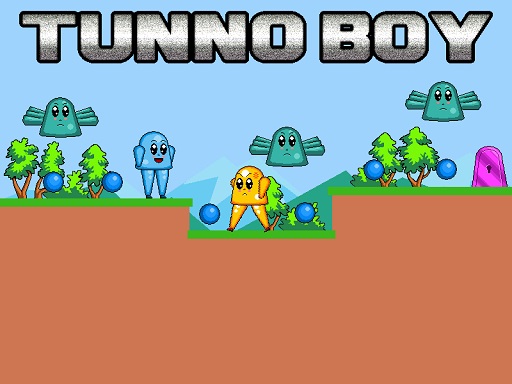
Seeking adventures? Well, you will have to dive into the world of Tunno Boy, a fabulous 2D platformer filled with colors where you get to be an adorable little character called Tunno! The fame of Tunno is echoed far and wide, but what is really expected of you? Collect all the blue magical balls while avoiding enemies, flying monsters, and sharp spikes to reach the Exit door that opens up the next level! There are 8 thrilling levels to adventure through, and you can rest assured that the challenge will be greater with every level, but are you worried? Don't be!
How to Play
Tunno Boy is easy to play. Here's what I want to tell you:
- Move Tunno around using the WASD keys or the Arrow keys.
- Hit the W or Up arrow key twice to perform a double jump, very useful for outclassing those places and collecting those tricky balls.
It's that simple: collect all the blue magical balls and hit the Exit door while avoiding enemies or flying monsters. But be wary of those spikes, because they're just vicious!
Features or Highlights
- Funny and Colorful Art Style: Tunno Boy is just that cute and bright, and so the game is pleasure to play.
- 8 Levels of Fun: Each level contains loads of challenges, from ball collecting to obstacle avoiding. The level of challenge also rises as you proceed, so you better be ready for some smart thinking and quick jumps!
- Exciting Soundtrack: Music is fast and catchy... each step of your Tunno Boy adventure will be fun.
- Simple Controls:This is perfect for all age groups-have fun learning from others.
Tips for Playing
Here are some suggestions to help you win in Tunno Boy:
- Plan Your Jumps: Always look ahead and plan where you need to jump to collect balls and avoid enemies.
- Stay Alert: Keep an eye out for flying monsters and spikes—they can appear out of nowhere!
- Practice Makes Perfect: If you fall, don't worry—just try again. The more you play, the better you'll get.
- Collect All Balls: Make sure to collect every blue ball before you try to exit the level.
Platform
You can play Tunno Boy on PC or mobile so go ahead and search it on your favorite game or app store!
Developer
Tunno Boy is developed by a set of cheerful and creative game designers who really want to create games geared toward bringing smiles and laughter to players' faces. They enjoy producing games which are easy on anyone to pick up, yet fun and challenging enough to keep you coming back for more.
So, what are you waiting for? Grab your controller or use your keyboard, and let's start the adventure with Tunno Boy! Happy gaming! 🌟🎮🚀