Breakout Game: The Ultimate Brick-Breaking Adventure! Introduction
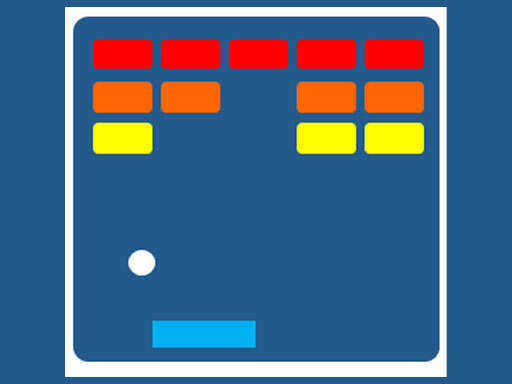
Hello, the future hellas of brick-breaking! 🌟 Breakout Game promises to conjure up classic fun smashing bricks with a bouncy ball! Imagine a screen filled with a top tier colorful brick arrangement, and your job? To knock all of them down by bouncing the ball with your paddle. Simple, lots of fun, and suitable for people of all ages! Shall we try?
How to Play
Playing Breakout Game is a hard treat to resist! Here's what you have to do:
- Tap on Play: Press the giant beautiful play button to hop right into the game.
- Move Paddle: Slide it left or right with your finger on the phone screen, and if interfacing the game on the computer, use the LEFT and RIGHT arrow keys on your keyboard. It feels like steering a tiny boat on water!
- Bounce the Ball: Bounce the ball off the paddle, and aim it at the bricks. Every time the ball hits a brick, the brick gets destroyed! Yay!
- Clear the Bricks: This makes your target: knocking down all the bricks at the top of the screen. But beware-how the ball will decide to bounce may at times be in all sorts of ways, and fast!
Features or Highlights
- Super Bright Colors of Bricks: These bricks are so bright that your eye is fully entertained!
- Simple Controls: Great enough for beginners, though challenges even more experienced persons. You will get used to it in no time!
- Endless Fun: Keep playing for as long as you want, testing your limits on how many bricks you can break at once!
- Challenge Yourself: Try to crush your highest score and boasting rights before your friends!
Tips for Playing
- Stay Alert: Keep your eyes on the ball and be ready to whisk off to safety with your paddle at a moment's notice.
- Predict Ball Path: Make your moves early based on where you project the ball to land.
- Do Not Stressed: Most importantly, if you lose, just start over!
- Have Fun: Keep in mind, the main goal here is enjoying yourself and having fun crashing those bricks!
Platform
The game can be played on almost any device! Be it computer, tablet, or smartphone, the game entertains you anytime, anywhere!
Developer
Window-inspired Breakout Game brings the fun to young players everywhere. Created originally by Atari in the year 1976, the game has since been modified and evolved to provide kids with a more enjoyable experience of the classic game of breaking bricks. The developers really enjoy watching players of all age groups have fun in brick breaking and hope you too will be happy!
So, what are you waiting for? Grab your paddle, ready to bounce, and break those bricks! 🎉🎮