Introduction to Yuas Quest Introduction
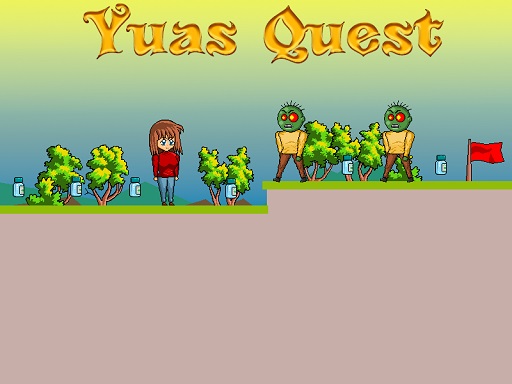
Hey there, adventurers! Come and experience the fun and exciting platformer, Yuas Quest, where you play alongside the cute anime girl, Yua. Your mission is to gather special bottles of antidote and save the world from a zombie virus! But beware: avoid terrifying zombies, saw blades, and reach the red flag to complete each stage! There are eight levels to play, each more difficult than the last. Can the world be saved, or will humanity remain in peril? Time to find out!
How to Play
Use your keyboard to help Yua move around and jump in Yuas Quest:
- Use WASD keys or Arrow keys to move left, right, up, and down.
- Press the W key or Up arrow key twice to execute a double jump to reach high places or to avoid obstacles.
It is all very straightforward: collect all the antidote bottles, steer clear of zombies and saws, and get to the red flag to reach the next level. Each level will, however, teach you something new to aid you in succeeding.
Features or Highlights
- Killer Anime Style: Yua is an elegant anime girl, and the entire game boasts this bright, colorful art style worth looking at.
- 8 Exciting Levels: Problems await in each level; from dangerous jumps to sneaky zombies. The difficulty will increase as you move up, so you'll be on edge from start to finish.
- There's Adventure In It: Collecting antidotes, avoiding dangers, and reaching the flag will keep you entertained.
- Slick Controls: Simple to learn but hard to master! Great for all sorts of players regardless of age.
Tips For Playing
- Plan Your Moves: Always keep an eye on the path ahead so you are not stuck or caught by zombies.
- Use Double Jump Wisely: Double jumping is great for those tricky spots...or dashing away from danger. Don't waste it!
- Stay Alert: Keep an eye out-because zombies and saws can show up anywhere!
- Keep Practicing: Fall and get up again after some of those washes. Ugly or slick, the more you will play, the better you become.
Platform
Here are two main platforms where Yuas Quest finds its home:
-
Web browsers: Just go to a website and start playing!
-
Mobile: Train any time anywhere.
-
PC: For big screen and better suspension!
Developers
The creators of Yuas Quest are a team of young game designers passionate about designing fun and engaging games for young players. They wanted to create a game that would entertain and challenge players while teaching them helpful skills for problem-solving and quick thinking. Developers are always eager to receive feedback from clients, so let your views be known!
Enjoy and best of luck to you in saving the world in Yuas Quest! 🌟