Play The Windows Game Online Free - Complete Game Review & Guide
What is The Windows Game?
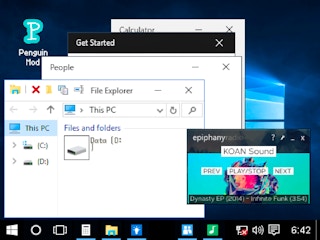
The Windows Game is a unique Windows 10 simulator designed to immerse you in the original Windows 10 experience. It offers a detailed and authentic recreation of the operating system, allowing you to explore and interact with classic applications and features.
How to Play
To enjoy The Windows Game, simply start the simulator and begin your adventure:
-
Simulation Features:
- Experience a shooting simulation.
- Engage with classic applications like Word, Paint, and Settings.
- Utilize the Calculator, File Explorer, and more.
- Discover the full suite of Windows 10 behaviors, including rearranging and pinning icons on the taskbar.
-
Interactive Interface:
- Engage in real multitasking, with state and layer tracking.
- Enjoy the authentic interface and sound effects.
-
Advanced Features:
- High-quality applications such as games, music, and a word processor are included.
- The game is built for multiplayer and is easy to modify.
-
Special Touches:
- Look out for many hidden nice touches within the simulator to enhance your experience.
Recommended next: Clean Health Center
Everything You Need to Know About The Windows Game
Game Information
- Game Title: The Windows Game
- Genre: simulation
- Platform: HTML5 Browser Game
- Release Date: 2024-12-25
- Players: Single Player / Multiplayer
- Price: Free to Play
- Rating: ⭐ 4.3/5 (1 votes)
- Total Plays: 0
Why Play The Windows Game on PlayCrazyGames?
game_y8.game_experience_free
- ✅ Instant Access - No downloads or installations
- ✅ Full Screen Mode - Immersive gaming experience
- ✅ Mobile Optimized - Play on any device
- ✅ High Performance - Smooth gameplay guaranteed
- ✅ Safe & Secure - 100% virus-free
- ✅ No Registration - Start playing immediately
How to Play The Windows Game
Master The Windows Game with these simple steps:
- Click the game container to start playing
- Use mouse click or keyboard controls (check game instructions)
- Complete objectives and achieve high scores
- Press fullscreen button for better experience
- Share with friends and challenge their scores!
Gameplay Tips & Strategies
To excel at The Windows Game, consider these expert tips:
- Start with tutorial levels to understand basic mechanics
- Practice regularly to improve reaction time and skills
- Watch video walkthrough for advanced strategies
- Take breaks to maintain focus and performance