Introduction
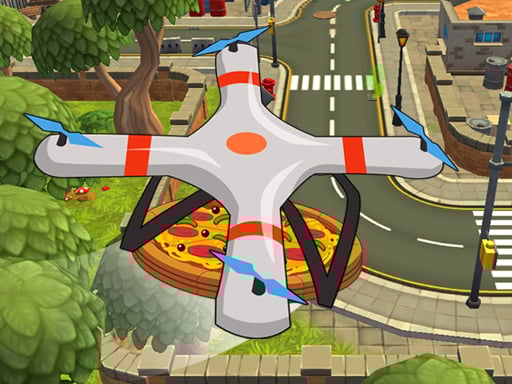
Hi, future pilots! It's time to ride the wings with Quadcopter FX Simulator! This super cool game is your playground to be the best-ever pizza delivery pilot. The task at hand? Race your cool quadcopter all through and deliver these yummy pizzas to the marked places at the speed of light by using the various given buttons to control the quadcopter so the pizzas arrive on time in each level. It is a little bit of heroism for pizzas in the real world!
How to Play
Use your keyboard to steer the quadcopter to pick up pizzas. Pressing W, A, S, D will move your quadcopter on the screen. Also, you can tap on some buttons rendered on the screen to make your quadcopter perform some nameless acts like speeding it up, stopping it, and initiating a flip! Your goal is very straightforward—pick up the pizza and fly it into the marked location without hitting anything! The levels proceed from easy to hard, so make your moves fast and clever!
Features or Highlights
- Awesome Quadcopter: Fly a sleek and awesome-looking quadcopter, which looks just like a pizza delivery mode of transport!
- Never-Ending Fun: With endless levels, each exciting than the previous one, you'd need to think fast to beat the clock.
- Simple Controls: Even for someone who's never played a game before, this would be easy-peasy with just W, A, S, D controls and button tapping.
- Satisfied Customers: Get those pizzas there on time to have happy customers!
Tips for Playing
- Stay Calm: If a little dizziness set in, don't panic! Just take a deep breath and focus on the marked spot.
- Practice Makes Perfect: Use every opportunity to play to become better in controlling the quadcopter.
- Look Out for Obstacles: Watch out for obstacles like trees and buildings on some levels. Plan your flight paths carefully!
- Tap Wisely: Remember to use those special buttons for all the best moments: speed when you're on track and stop when you really need to! But remember: speed can quickly become your worst enemy in a crash!
Platform
The game Quadcopter FX Simulator can be played on your PC or tablet. Accessibility is guaranteed, and you have fun playing it anywhere!
Developer
The people behind Quadcopter FX Simulator are some very imaginative game developers who love making fun and cool games for kids like you. They wanted to create a game not only for fun but one that also exercises your flying skills in a safe and fun way. The developers are always working on new games, so keep an eye out for more adventures!
Enjoy flying your quadcopter and delivering those awesome pizzas! 🚁🍕