Play Player Vs Zombie Online Free - Complete Game Review & Guide
What is Player vs Zombie?
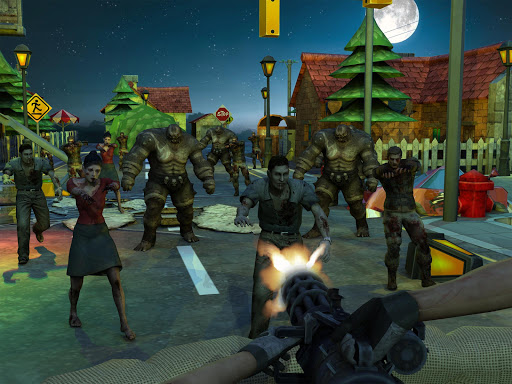
Player vs Zombie is a thrilling game where you take on the role of a lone character armed with various weapons across two distinct maps. You'll face off against soldiers in the first 10 levels and then switch to battling zombies in the next 10 levels. The game progresses with levels unlocking gradually, and each level becomes increasingly challenging. To help you survive, you earn money that you can spend on buying first-aid kits and grenades. You can also purchase these items in the game settings to enhance your chances of survival.
How to play Player vs Zombie
- WASD: Use these keys to move your character around the map.
- E: Press this key to use a medical kit when you need to heal.
- Tab: This key allows you to switch between your weapons.
- C: Crouch to protect yourself from incoming attacks.
- Esc: Pause the game to take a break or adjust settings.
- R: Reload your weapon when it's empty.
- Space: Jump to avoid obstacles and reach higher ground.
- G: Use a grenade to deal massive damage to enemies.
- K: Drop your current weapon if you want to pick up another one.
- Left Shift: Hold down this key to run, increasing your speed.
Recommended next: ROPE PULL
Everything You Need to Know About Player Vs Zombie
Game Information
- Game Title: Player Vs Zombie
- Genre: action
- Platform: HTML5 Browser Game
- Release Date: 2024-08-03
- Players: Single Player / Multiplayer
- Price: Free to Play
- Rating: ⭐ 4.6/5 (72 votes)
- Total Plays: 217
Why Play Player Vs Zombie on PlayCrazyGames?
game_y8.game_experience_free
- ✅ Instant Access - No downloads or installations
- ✅ Full Screen Mode - Immersive gaming experience
- ✅ Mobile Optimized - Play on any device
- ✅ High Performance - Smooth gameplay guaranteed
- ✅ Safe & Secure - 100% virus-free
- ✅ No Registration - Start playing immediately
How to Play Player Vs Zombie
Master Player Vs Zombie with these simple steps:
- Click the game container to start playing
- Use mouse click or keyboard controls (check game instructions)
- Complete objectives and achieve high scores
- Press fullscreen button for better experience
- Share with friends and challenge their scores!
Gameplay Tips & Strategies
To excel at Player Vs Zombie, consider these expert tips:
- Start with tutorial levels to understand basic mechanics
- Practice regularly to improve reaction time and skills
- Watch video walkthrough for advanced strategies
- Take breaks to maintain focus and performance