Kuma Bear: The Chocolate Adventure! Introduction
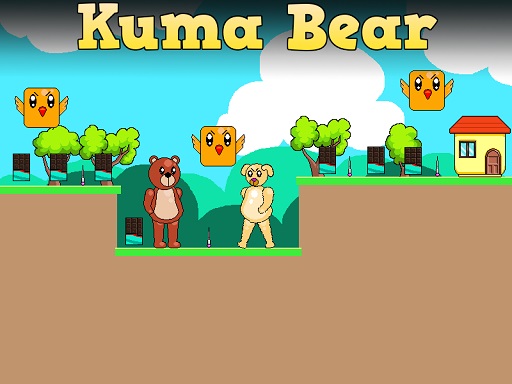
Greetings little adventurers! Have your spectacles ready to wear as you enter a domain with Kuma Bear, the coolest 2dimensional platform game. You play as a cute little bear called Kuma in this game. The mission? To collect all chocolate bars scattered about in a particular level while avoiding enemy dogs, pesky flying birds, hazardous spikes, and pins. But that is not the only task; from there, one has to go home to unlock the next level! Due to eight levels, each will be more difficult than the one before, so start warming up those jumping muscles!
How to Play
It is very easy and fun to play Kuma Bear. All you need to know are:
- Use the WASD keys or Arrow keys to control Kuma Bear with the keyboard.
- Press W or the Up Arrow key twice to double jump! This will let you reach high places where all the chocolate bars are placed.
Go from platform to platform, collect all chocolate bars, avoid the inconveniences of enemies and obstacles, and finally reach the house so you can go to the next level.
Features or Highlights
- Cute and Charming: Kuma Bear is a small bear that will charm players with its cute look and adorable animation.
- 8 Exciting Levels: Logic puzzles, tricky jumps, and enemy encounters fill each stage with increasing difficulty. So, get ready to think and jump through the whole way!
- Endless Fun: With lots of levels to play, you will spend great hours collecting chocolate bars and avoiding evil guys.
- Simple Controls: Easy to learn, but challenging to master! Suitable for every age.
Tips for Playing
Here are some tips to help you be the best Kuma Bear:
- Plan Your Jumps: Always look ahead and plan your jumps to avoid situations in which you are stuck or accidentally fall into spikes.
- Collect All Chocolate Bars: Make sure you get them all in every level to get a huge bonus!
- Watch Out for Those Enemies: Be on the lookout for enemy dogs and flying birds. Timing is everything to avoid them!
- Practice Makes Perfect: If you fall, just get back up and try again. Practice is what will make you a jump master!
Platform
You can play Kuma Bear on your computer, on a tablet, or on your phone! Just search for it in your favorite game store or app store.
Developer
Kuma Bear was developed by a team of creatively brilliant and fun-loving game developers who poured heart and soul into creating a game that would make kids smile and have fun. An interesting fact is that the developers love chocolate bars too; that explains why there are so many of them in the game!
Have a fabulous time playing Kuma Bear and collecting all the chocolate bars! 🐻🍫