Introduction
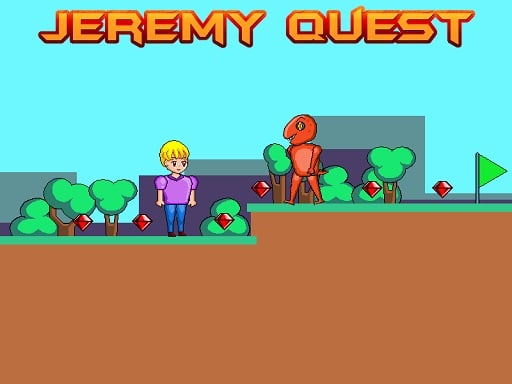
Well, there observers of adventure! Here comes the opportunity to jump into the fun world of an all-new 2D platformer game where Jeremy-the brave explorer-must collect shiny red gems while dodging those horrible monsters, fiery hazards, and sharp spikes to nonchalantly click on the green flag of the next level! With eight levels aplenty waiting for the player, one would be pushed to stretch those jumping skills as well as intelligence! 🎮✨
How to Play
Jeremy Quest is a game where you'll have to use the keys to get Jeremy through his epic journey.
- Left/Right: Press A and D or the Left and Right arrow keys to move Jeremy left and right.
- Jumping: Press W or the Up arrow key once to have Jeremy jump. Here is a neat little trick: press W or the Up arrow key twice to double-jump! This helps in getting low climbs and collecting those cunning gems. 🚀
In order to have fun, you have to collect all the red gems scattered through the level while avoiding the monsters set out to catch you, fire which can burn you, spikes which will hurt Jeremy, and get to the green flag. Once you get there, the level is reflected as win, and you move to the next.
Features and Highlights
-
8 Exciting Levels: Each level comes with its fair share of hazards, from tricky jumps to sneaky monsters. The difficulty level bumps up as you progress. So stay sharp!
- Shiny Red Gems: Collecting all those red gems will cause the green flag to appear, which will then allow you to proceed. They'll be hiding in places you least expect!
- They're out to get you!: Monsters always chase you. Running away is your only option, or you are just going to restart!
- Fire and Spikes: Just because fire and spikes are environmental hazards, it doesn't mean they won't hurt Jeremy!
- The cool double jump: Utilize the double-jump to reach extreme heights and grab those tricky red gems. Don't waste time and keep practicing!
Tips for Playing
- Plan Your Moves: Look out for monsters, fire, and spikes before making that jump!
- Collect Gems First: Sometimes it is a better idea to take care of those so-called red gems before you ever try and reach that green flag. That gives you something not to worry about later.
- Practice Makes Perfect: Falling is okay, first try though! The more you do it, the better you'll get at it.
- Stay Calm: The harder it gets the more calm and calculated it should be. Panicking leads to mistakes.
Platform
Playing Jeremy Quest becomes easy on your PC! No specialized equipment is required by just putting aside free time for the game. Perfect for at-home or classroom playing.
Developer
Jeremy Quest was developed by a team of friendly game engineers who certainly love developing fun and challenging titles for kids like you. They wish you lots of fun playing and collecting those gorgeous red gems!
So, what are you waiting for? Grab your keyboard, help Jeremy on his quest for the red gems, and have fun! Happy gaming! 🌟🎉