Gem Twins - A Cute and Fun Puzzle-Platformer! Introduction
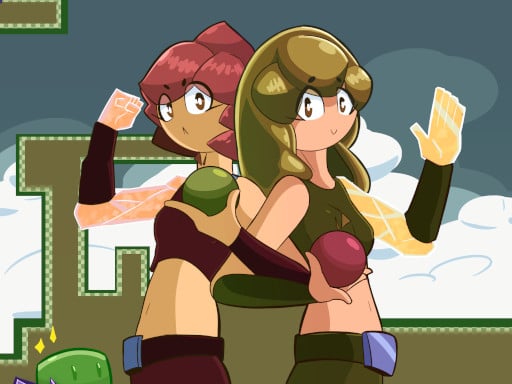
Hello, young adventurers! 🌟 Wouldn't you like to play a game where you control two cute twin brothers who can transform into stone? Of course! In Gem Twins, you and your sibling partner up to solve all the fun but tricky puzzles and jump through levels. Just like any old-school classic, this one is all about colorful pixel art with smooth platforming, which will surely test your mind and give your fingers some exercise!
The Gameplay
In Gem Twins, you'll control two brothers, Leo and Mia. They're not just any brothers; they are certainly able to use the power of turning to stone:
- Move Left and Right: Use the A and D keys (or the Left and Right arrow keys) to move Leo and Mia around.
- Jump: Press W (or the Up arrow key), X, or U to make them jump. Watch out for those gaps!
- Switch Characters: Hit Space, U, or C (or O) to switch between Leo and Mia. This is super helpful because each brother has their own special moves!
On a mobile device, those same things are done by on-screen controls, basically easy to get a hold of with your fingers!
Features or Highlights
- Colorful Pixel Art: The looks really grab one's attention with bright colors and retro-style graphics that bring memories of good old days.
- Special Powers of the Twins: Leo could turn into stone to make bridges, whereas Mia formed stone to block enemies. They really need to help each other!
- Tricky Puzzles: Each level is a small brain storming exercise. You must figure out how to get both the brothers to the finish line.
- Fluid Platforming Experience: Bounce, jump, and slide through tantalizing levels full of traps and secrets.
Tips for Playing
- Team Up!: Keep in mind that Leo and Mia are best buddies. Use their powers to the utmost effect to assist each other!
- Plan Your Moves in Advance: Scoping a level before embarking on it always comes handy. Think of areas in which you will need to turn to stone, and places where jumping is required.
- Never Give Up: When you get stuck, think about approaching the puzzle in another way. Every single one does have a solution, and you are worthy of finding it!
Platform
This one is accessible through your desktops, tablets, and smartphones. It is accessible and fun to carry anywhere.
Developer
The team of friendly developers that made Gem Twins really love making games that are both challenging and fun. They were inspired by the classic games they played when they were kids and wanted to create something that would make you feel like you're on an adventure!
So, grab your friends, get ready to jump, and let’s turn into stone together in Gem Twins! 🎮🌟